
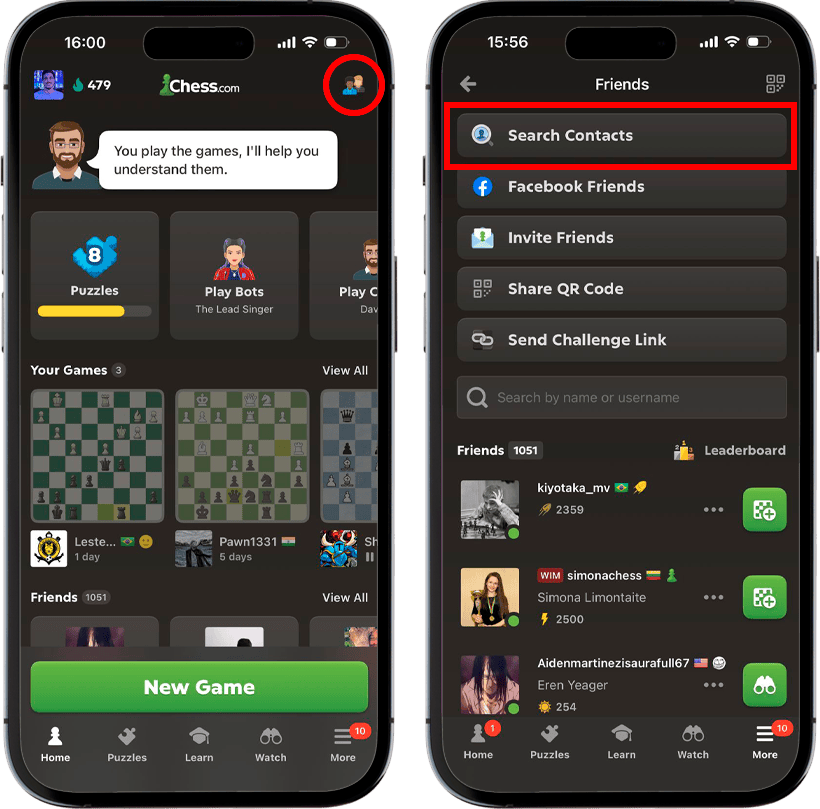

Your friends could already be playing chess—and you might not even know yet! We’re excited to introduce a new way for you to find and play with friends on Chess.com. Sync your contacts and connect with your friends with a single tap, so you can start playing together right away!
Whether it’s a casual game, a friendly rivalry, or a quick rematch during a break, playing chess is always more fun when it’s against people you know. To find your friends, open the Chess.com app on your phone. On the home screen, tap menu at the bottom right, then the Friends icon on the top right. Then, tap the Search Contacts option at the top.
You’ll instantly see a list of all the people on your contacts list that are already on Chess.com. You can easily send them a friend request by tapping the green “+” button.

You can also use this feature to grow your chess circle. Scrolling down, you’ll see a list of all the people on your contacts list who are not on Chess.com yet. You can still invite them to connect with you by clicking the “Invite” button and choosing your preferred method. This tool is a simple way to bring friends into the game and share the joy of chess with them!
On web, you can also search for your Google contacts and Facebook friends who are on Chess.com. Go to your Friends page, click the Find Friends button at the top, and choose your preferred option. On that same page, you can also add your phone number to make it easier for your friends to find you.

Take a moment to check your contacts and see who’s already playing—or who might be ready to start. Connect with friends, invite new opponents, and make your games on Chess.com even more personal!