

ChessBase Magazine offers top-class training material for club players and professionals! World-class players analyse their finest games and explain the ideas behind the moves. Opening specialists present the latest trends in opening theory and exciting ideas for your repertoire. Master trainers in tactics, strategy and endgames show you exactly the tricks and techniques you need to become a successful tournament player! Available as a download (including the magazine as a PDF file) or as a printed magazine with a download key sent by post.
Included: CBM #231 as a “ChessBase Book” for iPad, tablet, Mac etc.! At books.chessbase.com
In ChessBase, medals serve as visual markers to highlight games with special characteristics. These small, colored symbols appear in the game list and make it easy to spot interesting, instructive, or noteworthy games at a glance. Especially in large databases—such as the ChessBase Magazine collections or the Mega Database—medals greatly improve navigation and orientation.
The premiere chess database with over 11.7 million games
The ChessBase Mega Database 2026 is the premiere chess database with over 11.7 million games from 1475 to 2025 in high quality.
About Medals
There are different types of medals, each highlighting a specific focus. Some of the most common include “Best Game” (gold), “Model Game” (dark blue), “Novelty” (blue), “Strategy” (brown), “Tactics” (reddish-brown), and “Sacrifice” (red). Each medal has its own color, allowing you to immediately see why a game has been marked as special.
Medals can be assigned in two ways: automatically and manually. In official publications—such as tournament databases or annotated game collections—medals are often added by the author or through computer-assisted analysis. However, you can also assign medals yourself, which is especially useful for players who want to organize their own collection or focus on specific training priorities.
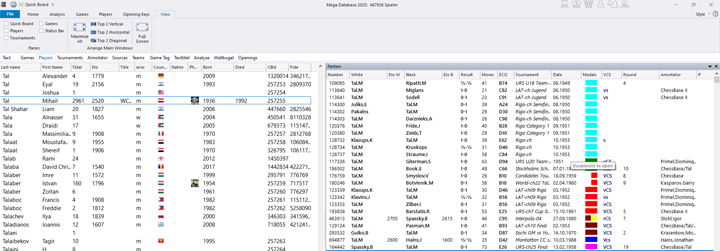
Example from the Mega Database 2025: Naturally, there are some beautiful games by Mikhail Tal. Here, we clicked on the “Medals” tab, and all games marked with medals are listed at the top, sorted by color. It’s no surprise that a large number of red medals—indicating tactical brilliance—appear for the former World Champion.
Manual “Medal Awarding”
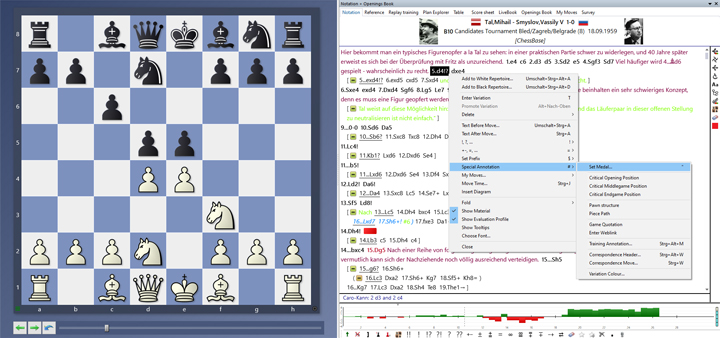
Assigning medals manually is simple. We’ll demonstrate this using the game Tal–Smyslov from the 1959 Candidates Tournament, which includes medals, annotations, and brilliancy awards (see above).
In the notation of a game, right-click on the move where you want to place the medal, then select “Special Annotation” followed by “Set Medal.” Alternatively, you can simply press the quotation mark key (SHIFT+2).
Smyslov cultivated a clear positional style and even in sharp tactical positions often relied more on his intuition than on concrete calculation of variations. Let our authors introduce you into the world of Vasily Smyslov.
If you want to assign medals to multiple games at once, you can do this directly from the game list.
On this DVD Dorian Rogozenco, Mihail Marin, Oliver Reeh and Karsten Müller present the 8. World Chess Champion in video lessons: his openings, his understanding of chess strategy, his artful endgame play, and finally his immortal combinations.
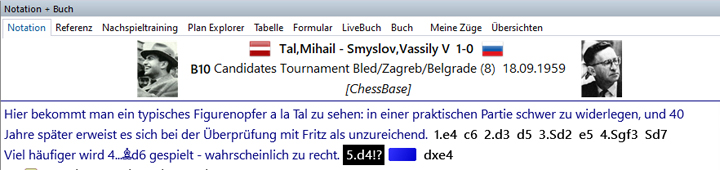
We discovered by checking the references that Mikhail Tal was the first to play 5.d4, and we want to mark the move as a novelty.
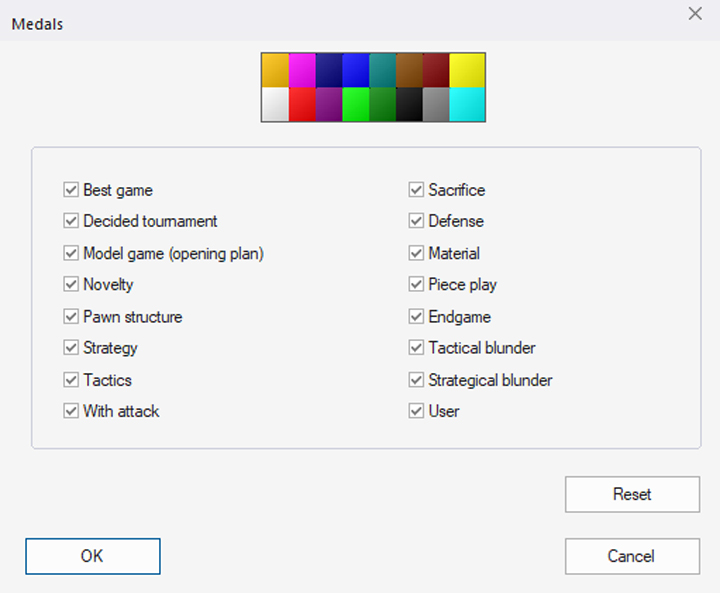
In the menu window, we can assign colors to the medals by checking the corresponding boxes above. “Novelty” is blue, for example. If we check only this box, the notation changes as follows:
Removing Medals
Removing medals is just as simple: If you want to delete the novelty medal you just set, right-click on it and return to the menu shown in the second-to-last screenshot. There, select “Reset” to remove the medal.
Filter Function
One particularly useful feature is the medal filter. In the search mask (see Tutorial 19), there is a dedicated tab for medals that allows you to search specifically for games with certain distinctions. You can also select multiple medals at once—ChessBase 18 will then display only the games that meet all selected criteria. This makes it easy to quickly find games with notable tactical content, for example, or to filter for games featuring key strategic turning points. The medal colors are also shown in the filter menu, making the selection intuitive and visually guided.
Pro tip
Using medals in a targeted way is especially valuable for beginners. For example, marking mistakes in your own games with a “Blunder” medal allows you to later analyze recurring weaknesses more effectively. Brilliant sacrifices or combinations can also be easily found again this way. Anyone who regularly analyzes their own games or collects training material can use medals to build a systematic database tailored to their personal learning goals.
Example:
A typical scenario for beginners might look like this: You review a game, spot a noteworthy combination, and mark the game with a Tactics medal. Later, you want to revisit tactical examples for training and use the filter to display only games with that medal. Over time, this creates a personalized collection of examples you can focus on and work with in a targeted way.
Conclusion
In summary, medals are an extremely useful tool in ChessBase that make it easier to organize large amounts of data, quickly identify instructive games, and create targeted training content. Beginners especially benefit by building their own learning collections, marking typical mistakes, and making strategic highlights easy to find again. Anyone who uses medals regularly will be rewarded with a clearer overview and more efficient training sessions.
We wish you lots of fun awarding your medals!
——
ChessBase has developed over decades to become what it is now in its 2026 version. The program has countless options, which we will present here in small portions – so you can design your interface for pleasant daily use and keep learning about new options and how to use them to get the most out of ChessBase´26 and save time.
We hope that this tip will help you to have more fun and be more successful when using ChessBase´26. You can find more tips and hints on our support pages and FAQ pages.
All parts of the series and more links:
FRITZ is more than just a chess engine – it’s a training revolution! Whether you’re taking your first steps into the world of club chess, or already playing at a tournament level: with FRITZ, you can train more efficiently, intelligently and with a more personalised approach than ever before.