
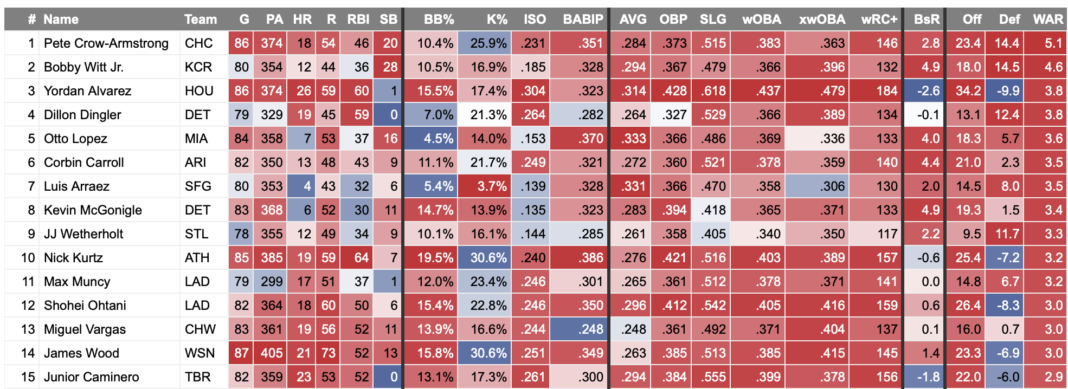

FanGraphs Members may have noticed an incredible new feature over the last couple weeks, and today, we’re thrilled to officially announce it. Members now have access to Heat Maps on our leaderboards and player pages. Sean Dolinar has been hard at work for the past month or so putting this together, and now I get to walk you through this Members-exclusive feature.
Where To Find Them
Heat Maps are available on all Major League Leaderboards:
And on all player pages for position players (here’s Shohei Ohtani):

As well as pitchers (Ohtani again):
You Aren’t a FanGraphs Member
It looks like you aren’t yet a FanGraphs Member (or aren’t logged in). We aren’t mad, just disappointed.
We get it. You want to read this article. But before we let you get back to it, we’d like to point out a few of the good reasons why you should become a Member.
1. Ad Free viewing! We won’t bug you with this ad, or any other.
2. Unlimited articles! Non-Members only get to read 10 free articles a month. Members never get cut off.
3. Dark mode and Classic mode!
4. Custom player page dashboards! Choose the player cards you want, in the order you want them.
5. One-click data exports! Export our projections and leaderboards for your personal projects.
6. Remove the photos on the home page! (Honestly, this doesn’t sound so great to us, but some people wanted it, and we like to give our Members what they want.)
7. Even more Steamer projections! We have handedness, percentile, and context neutral projections available for Members only.
8. Get FanGraphs Walk-Off, a customized year end review! Find out exactly how you used FanGraphs this year, and how that compares to other Members. Don’t be a victim of FOMO.
9. A weekly mailbag column, exclusively for Members.
10. Help support FanGraphs and our entire staff! Our Members provide us with critical resources to improve the site and deliver new features!
We hope you’ll consider a Membership today, for yourself or as a gift! And we realize this has been an awfully long sales pitch, so we’ve also removed all the other ads in this article. We didn’t want to overdo it.

The heat maps also apply to minor league stats on player pages. Here’s Kevin McGonigle:

And Nolan McLean:

So many colors, so cool. But as for how those colors are determined…
Settings and Toggles
All screenshots above were created using the default settings, which can be adjusted by clicking the gear next to the on/off toggle above the data grids that allow for heat mapping:


Percentile vs. Standard Deviation
Choosing Standard Deviation over Percentile will color based on how many standard deviations from the league mean a player is (using a normal, or Gaussian, distribution), rather than ranking all the players and disregarding how large the gaps are between players. This will cluster more players around the mean (i.e., white cells or barely off-white) and is especially apparent for stats in which one player is significantly better or worse than the mean. For example, look at the color for Cristopher Sánchez’s changeup rate:

Minimum PA/Minimum IP Toggles
The heat maps will show for all players regardless of the Minimum PA/IP selected. That minimum sets the group of players in the baseline, with all players measured against that baseline. A lower minimum naturally enlarges the group of players.

This is helpful for looking at players with too few plate appearances or innings to qualify for rate stat leaderboards while ensuring that the player of interest is actually within the baseline. Those toggles do not have to (and will not automatically) match your settings for leaderboards, so you can look at a leaderboard of qualified batters only but a heat map relative to those with a minimum of 100 plate appearances, or vice versa.
For minor league stats, level-specific stats are measured against players at that level, applying the same IP/PA minimum you’ve set. Combined minor league stats are measured against the entire minor leagues.
Display Style
The default view, Full Grid, highlights every player on the data grid you’re viewing, but if that’s too overstimulating, the other options are:
- Hover Row: Applies heat mapping to only the row upon which your cursor is hovering.
- Hover Column: Applies heat mapping to only the column upon which your cursor is hovering.
- Extremes: Applies heat mapping only to players in the top and/or bottom 5%, 10%, or 20% of players.

The Extremes display style is a favorite of mine, enhancing readability by drawing your eyes to only the most, well, extreme. Here’s how our pitching leaderboards look with only the top and bottom 20% mapped:

Stat Types
In conjunction with the Display Types, unchecking the Counting or Rate box here will also reduce the number of cells that are highlighted. Counting stats include stats accumulated over a full season that can’t be taken away from a player, like home runs and strikeouts, but also any volume-based stat like WAR or FRV, even though those values will fluctuate and can decrease. Rate stats are all the “per X” stats, whether per plate appearance (like K% or wOBA), nine innings (like ERA or FIP), or anything indexed to 100 (like wRC+).
Colors
The view defaults to the “red is good, blue is bad” color scheme you’re probably familiar with from Baseball Savant, but for accessibility purposes (or if you just like wacky colors), you can choose from a preset group of colors or click Show Colors for any one you’d like.

If you love the idea of highlighter yellow being good and purple being bad, we can accommodate that.

In many cases, the directionality of a stat (i.e., whether higher or lower is better) is clear, but some stats don’t inherently have a good or bad direction. For example, a pitcher throwing more fastballs isn’t good or bad: It’s just information. In that case, we always display higher numbers as “better” and lower numbers as “worse.”
Final Housekeeping
Once again, the Heat Maps feature is available only to FanGraphs Members. If you’re not a Member, you can subscribe here.
And for any feedback on the Heat Maps, there’s this message at the top of the settings box where you can weigh in:

That’ll open this New Feature Feedback box, which goes to a centralized repository that’s a lot easier for us on the development team to keep track of than combining feedback from BlueSky, Twitter, and email.
